Windows Endpoints
What Hal reads
For Windows servers and workstations, Hal puts two things on an endpoint: a lightweight, userspace log shipper, a Fluent Bit forwarder that reads Windows event logs and ships them to Hal over HTTPS, and a copy of the installer that keeps it current when you or your RMM run it (Keeping hosts current, below). Neither is an EDR or runs a kernel driver, and the forwarder has no command channel. Nothing Hal ships runs in ring 0, so the failure behind the CrowdStrike outage, a faulty kernel driver taking the machine down with it, has no path here. A bad collector build stops log collection, which Hal flags as silence.
What each host ships depends on its role, which the installer detects from Windows itself:
- Every host: the Security log, filtered to the events that matter for detection (sign-ins and logoffs, process and persistence events, scheduled tasks, account and group changes, RDP sessions, share access, credential manager), plus Task Scheduler, Windows Firewall, DNS Client, System, Application, PowerShell and Defender channels.
- Servers and domain controllers add the Terminal Services (RDP) and certificate channels, because servers are the lateral-movement targets.
- Domain controllers add the directory events: Kerberos and the KDC, directory object operations, computer accounts and trusts, domain group lifecycle and SID history, replication, plus the Directory Service, DFS Replication and DNS Server channels.
Each endpoint reports under a stable machine identity, so Hal can tell one machine from another over time, and it sends a heartbeat every 15 minutes. Events are retained 365 days, like every other source.
How it ships
Events travel over HTTPS to your deployment’s collector address under
<code>.runhal.com, where <code> is the code in your portal address, behind
an access gateway with a service token the installer carries. The host needs
outbound HTTPS on port 443 to your deployment’s addresses under
<code>.runhal.com (allow *.<code>.runhal.com) and nothing else: no VPN, no
inbound port, no agent registration. The installer’s own
check with the instance, and the build it fetches when it is behind, go to
the same address, so there is nothing further to allow.
The installer
One Windows installer does the whole job: it installs Fluent Bit silently
from the copy embedded in it, writes a config for this host, mints the
machine identity, sets the Windows service to restart itself after a crash,
starts it, and leaves its own current build on the host for later updates. It
runs on 64-bit Windows. Installing needs administrator
rights, and the installer asks Windows for them only when it reaches its
first write, so from a standard prompt or a double-click you see the UAC
prompt then; -help and every refusal need no rights at all. From your RMM
running as SYSTEM nothing prompts, because the job is already elevated.
Fluent Bit lands in C:\Program Files\fluent-bit as the fluent-bit
service. That directory also holds the host’s identity file,
hal_machine_id. Nothing you run should ever delete it.
Every installer carries its own help page. hal-collector-setup.exe -help
(also -h or /?) prints the usage, every option, the exit codes, an example
per operation, and which build the file is: a client’s own build names its
client, and the any-client build says to pass -client. It also prints the
installer build, the value the Version column on Logs → Endpoints
shows when you hover a row.
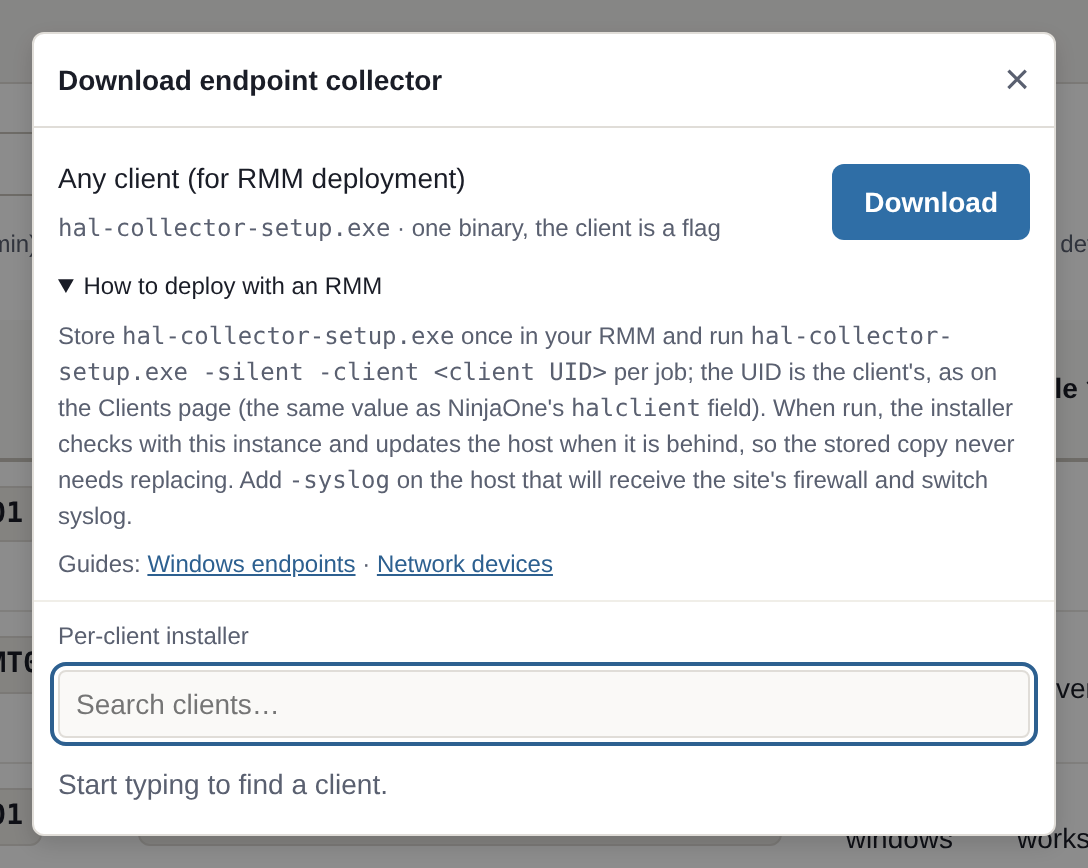
There are two downloads, both on Logs → Endpoints → Download Installer in your portal, and both require you to be signed in:
| Download | What it is | Run |
|---|---|---|
hal-collector-<client>.exe, pick a client | That client’s own installer, with the client baked in | Run it on the machine by hand, or from your RMM with -silent |
hal-collector-setup.exe, the “Any client” row | One installer for your whole deployment; the client is a parameter | hal-collector-setup.exe -silent -client <client UID> from your RMM |
The same installer makes a host the site’s syslog collector. With
-syslog, the host keeps shipping its own event logs and also listens on the
LAN for the syslog of the site’s firewalls, switches and other devices,
forwarding it under the same client. It is refused on a domain controller. The
whole procedure, from picking the host to pointing the devices at it, is on
the Network devices page.
Deploying from your RMM
Two jobs, in order. The first install runs the any-client installer from
your RMM’s library with the client’s UID. Everything after that runs the
copy the installer leaves on the host, with -update, and stores nothing and
passes nothing. If your RMM runs PowerShell, the second job is ready as a
script: The update job as a script, below.
Do not
Never remove the collector by deleting C:\Program Files\fluent-bit or by
deleting the fluent-bit service yourself, and never uninstall before
reinstalling. That directory holds the host’s identity file,
hal_machine_id. Deleting it turns the host into a new endpoint: a second
row on Logs → Endpoints, and a second row for every network device the
host collects syslog for. To reinstall or change the configuration, run the
install command again: it installs over what is there and keeps the
identity. To remove, use -uninstall, which keeps the identity file. A
deployment script must not carry a “clean reinstall” step, and must not
pass -reassign on every run.
First install. Put hal-collector-setup.exe in your RMM’s script or file
library and run it per host with that host’s client UID. The client UID is
the value in the Client UID column of Hal’s Clients page. It is the same
value you put in NinjaOne’s halclient organization field, so a deployment
job that can read that field can pass it straight through.
hal-collector-setup.exe -silent -client cli_01kwfenm48fzkr9kdepq9thrwr
The same from a PowerShell script, so the job’s result is the installer’s exit code and its output is the installer’s result line:
$uid = "cli_01kwfenm48fzkr9kdepq9thrwr"
& .\hal-collector-setup.exe -silent -client $uid
exit $LASTEXITCODE
A per-client installer carries its client, so it takes no -client:
hal-collector-acme.exe -silent
Keeping hosts current. After a successful install the installer leaves
its own current build at C:\Program Files\fluent-bit\hal-collector-setup.exe,
beside the collector it installed. From then on the RMM job for every host,
site collector or not, is one line:
"C:\Program Files\fluent-bit\hal-collector-setup.exe" -silent -update
-update reads the host’s installed configuration from what the last run
recorded there: the client, and whether the host is the site’s syslog
collector and on which port. Nothing is asked again, so nothing on the job
can go stale or switch a collector’s listener off. It then checks with your
instance, over the same address the collector ships to. A host that runs the
current collector is left alone, and the run exits 0 after one small request.
A host that is behind is refreshed. When the resident copy is itself behind,
it fetches the current build from your instance, checks its size and
checksum, and runs it: that run upgrades Fluent Bit in place when the build
carries a newer version, never a downgrade, rewrites the configuration,
restarts the collector, and replaces the resident copy with itself. So a
collector fix, a configuration change or an approved Fluent Bit version
reaches every host on your RMM’s own schedule, and the job line never
changes.
Hosts installed before the resident copy existed acquire it on their next run
of the installer, from your library’s copy or a fresh download, and take the
-update line from then on. A stored copy checks in the same way when it
runs, so an old copy in your library refreshes a host with current bits
rather than its own. Only a copy downloaded before the installer learned to
check in has to be replaced, once. Adding a client never makes anything
stale: no client list travels in the installer, and the instance is the only
authority on which clients exist.
A site collector needs no special job. -update reads the syslog role
from the host, so the same line keeps a collector’s listener and a plain
host’s configuration current alike. The listener is switched off only by
running the full install command again for the client without -syslog,
because that command line is taken as the whole intended configuration. Use
the full command to change a host deliberately, and leave the routine job on
-update. Network devices has the rest.
Run either installer without -silent from a terminal and it prints its
progress and exits: that it is checking with the instance, that a newer build
is being fetched when there is one, each step of the install, and where it
left the host’s installer for -update. Its last line is the result line
described below. Double-click it instead and the window stays open until you
press Enter, so the result can be read.
- The exit code is 0 on success, or when the host was already current and
there was nothing to do; 1 when the install or uninstall failed or was
refused, with the reason on stderr; 2 for a command line that cannot be
meant, an unknown option, a flag without its value, or any argument that is
not a dash option such as
/silentor a stray word, which installs nothing and points to-help; and 3 when the installer could not reach the instance, in which case nothing at all is changed. Your RMM can tell a 3 from success and from failure.-silentsuppresses the progress output only, never waits, and never prompts for rights: an unattended run without administrator rights fails with exit code 1 rather than raising a dialog nobody can answer. A failure’s reason still goes to stderr. Fluent Bit itself always installs silently. - Exit 0 covers both a host that was updated and one that was already
current, so every run that succeeds,
-silentor not, ends with one line on standard output saying what it did. Your RMM shows it as the job’s output:Hal collector: already current — build <build> for client <client UID>; nothing to update.,Hal collector: updated — build <build> for client <client UID>; running.(installedwhen Fluent Bit was not on the host before, with(syslog collector)after the client UID on a site collector), or, for-uninstall,Hal collector: uninstalled.orHal collector: not installed on this host — nothing to do.The build is the one the Version column shows when you hover the host’s row. An older copy, such as a seed in your library, that finds the host already current names no build, because it knows only its own. -updatepromises the same configuration, so it is refused with exit 2 alongside-client,-syslog,-syslog-port,-reassignor-uninstall: a change is a normal run with the full command. On a host with no recorded install it exits 2 and says to install first. On a host where the collector was installed and someone has since removed Fluent Bit through Apps and Features, the same-updatejob puts it back.- A
-clientvalue your instance does not know is refused before anything is installed, with a message pointing at the Clients page, so a mistyped UID, a short code in place of a UID, or a client that does not exist never sends a log. - When the instance cannot be reached, the installer exits 3 and writes nothing, whatever the host’s state: not yet installed, installed, or a requested change. The check-in and the collector’s shipping use the same address, so a host that cannot check in could not deliver events either, and an install that reported success there would hide the one fault that needs a person. Run the job again once the host can reach the instance.
- If Windows Installer is busy, typically Windows Update, the installer waits and retries several times before it gives up.
- If Fluent Bit is already on the host and Hal did not install it, the installer refuses to touch it.
The update job as a script
This PowerShell script is the update job for any host your RMM manages. It
runs the resident copy with -silent -update and nothing else, so it needs
no stored installer and no client UID, and it never installs:
# Keep a host's Hal collector current. Nothing to set: the client and the
# syslog role come from the host, so the same job runs on every host.
[Console]::OutputEncoding = [System.Text.Encoding]::UTF8
$resident = 'C:\Program Files\fluent-bit\hal-collector-setup.exe'

if (-not (Test-Path $resident)) {
    Write-Output "Hal collector: no installer at $resident; run the install command once."
    exit 2
}
& $resident -silent -update
$code = $LASTEXITCODE
switch ($code) {
    0 { }
    1 { Write-Output "Hal collector: the update failed; the installer's reason is on stderr." }
    2 { Write-Output "Hal collector: this host has no recorded install to update; run the install command once." }
    3 { Write-Output "Hal collector: could not reach the Hal instance; nothing was changed." }
    default { Write-Output "Hal collector: exit code $code." }
}
exit $code
- The job’s exit code is the installer’s, and a successful run’s output is the installer’s result line. A failure adds one line of the script’s own, so the output says what happened even where your RMM shows stderr apart.
- Exit 2 means the host needs the install command once. Either it has no resident copy, because the collector was never installed or was installed before the installer kept one, and the script runs nothing; or it has the copy and no recorded install, and the installer refuses before writing anything. Either way nothing on the host is changed.
- The first line makes Windows PowerShell read the installer’s output as UTF-8, which is what the installer writes, so the dash in its result line arrives intact.
Updating, moving and removing a host
Keep current. The resident copy with -update, as above:
"C:\Program Files\fluent-bit\hal-collector-setup.exe" -silent -update
It checks with the instance, refreshes the host if it is behind, fetches the
newer build first if the resident copy is behind, upgrades Fluent Bit in
place when the build carries a newer version and never downgrades it, and
replaces the resident copy. An upgrade that fails, Windows Installer being
busy on a patch night for instance, puts the previous version back and
restarts it, so the collector is never left down waiting for the next run. The Agent column on Logs → Endpoints
shows the Fluent Bit version each host runs. The host keeps its machine
identity throughout. Running the full install command again for the same
client does the same work and, in addition, applies whatever the command line
says, so on a collector host it must carry -syslog: a run without it turns
the listener off.
hal-collector-setup.exe -silent -client cli_01kwfenm48fzkr9kdepq9thrwr
Move a host to another client. A re-run that names a different client is
refused, with both clients named, because a wrong RMM variable must not move
a host’s events into another client’s records. When the move is intended,
say so with -reassign:
hal-collector-setup.exe -silent -client cli_01kwfenm3ge8j9yrq69q3qjcrp -reassign
Remove. This removes the collector and Fluent Bit together, and a syslog collector’s firewall rules with them. It needs no client, and it refuses if the Fluent Bit on the host was not installed by Hal. It can be run from the resident copy too: the installer moves itself out of the directory it is wiping, and Windows deletes that file at the next restart. The one thing an uninstall leaves behind is the host’s machine identity, so a later reinstall keeps the endpoint’s row and its history on Logs → Endpoints. Only a reimage, which loses that file, starts a new one.
hal-collector-setup.exe -silent -uninstall
Verifying
A new host appears on Logs → Endpoints within its first heartbeat, about 15 minutes, with its client, role, agent version, the collector version its configuration came from and its last heartbeat. From then on you can ask Hal about it in chat: he can list a client’s endpoints as the page shows them, say which are behind, and remove a stale row when a host appears twice.
The Version column is how you see which hosts still run an older
collector. Every host on the current collector shows the same value, so a
host showing a different one, or an em dash, which marks a host installed
before the column existed, is a host to bring current: run -update on it,
and it fetches what it needs. Hover a value for the installer build. The
Collector column names the hosts that also collect their site’s syslog,
with the port. Both columns have a filter pill, so the hosts on one version,
or the collectors alone, are one click.
A host your RMM shows online whose heartbeat has stopped is a collector to
restart from the RMM. The tab flags a host silent for more than 24 hours as a
possible coverage gap. The collector keeps its own log at
C:\Program Files\fluent-bit\fluent-bit.log on the host, which is where to
look when a host is installed and nothing arrives.
When Hal is unreachable
The collector keeps every undelivered chunk on disk and retries with backoff until it gets through, under a 2 GB cap per host. An instance that is down for hours or days is buffered on each host and drained when it returns, with events filed at the time they happened. Only when the cap fills do the oldest chunks give way.
See also: the SIEM and read-only by architecture.
See what Hal surfaces on your own clients.
No deck. Ask us anything first. When you want to see Hal on your own tenants, we sign a short evaluation agreement and stand up your instance; you connect one tenant, Hal watches it for 14 days, and we walk you through what he found.
- 01You ask us your questions. No deck, no demo dataset.
- 02You sign a short evaluation agreement, and we stand up your own instance.
- 03You connect one tenant from your own admin console. Hal watches it for 14 days.
- 04We walk through what he found. Keep going month to month, or revoke the scopes yourself and stop.