Network Devices
What Hal reads
Routers, firewalls, switches, wireless controllers and any other device that can send syslog feed Hal through a Hal collector on the device’s own LAN. The flow is one-way in: the device sends, the collector forwards, Hal receives. He never reaches back into the devices, and nothing is installed on them.
Everything a device sends is kept. Every record holds the whole line as it arrived, so nothing is lost to a format the parser did not expect. The events are searchable alongside the client’s cloud and endpoint sources, read by the same triage pipeline, and retained 365 days like every other source.
How it reaches Hal
The collector is the same Windows endpoint collector
every other host runs, installed on one always-on Windows machine per site
with the -syslog option. That host keeps shipping its own Windows event logs
and, in addition, listens for syslog on the LAN, UDP and TCP, port 514 by
default. Every device
at the site points its syslog at that host’s LAN address. The collector stamps
each record with the client it was installed for and forwards it over HTTPS to
your deployment’s collector address, the exact path Windows events already
travel.
So the network side of a site needs:
- nothing installed on the devices;
- no inbound port on the internet, no VPN and no relay of your own;
- outbound HTTPS on port 443 from the collector host, which it already has.
One collector takes any number of devices. A client with one site needs one collector. A client with five sites needs one per site, or one for several sites if their LANs route to each other. Two collectors at one client are simply two host names on otherwise identical records.
What each record carries
A syslog line says which hostname claims to have sent it and nothing else. The collector adds what it knows:
| Field | What it is |
|---|---|
| Client | The client the collector was installed for: chosen by a person, checked against your client list at install, and guarded against accidental reassignment |
| Device | The hostname in the syslog header, and the device’s LAN address as the sender |
| Collector | Which host forwarded the record, by name and by its machine identity |
| Transport | UDP or TCP |
| Device time | The device’s own timestamp, kept as it was written |
| Raw | The whole line, exactly as received |
Two consequences matter. Where a line is filed is decided by the collector, not by the device. Every line reaching a site’s collector goes into the records of the client that collector was installed for, the one whose UID was on the install command, whatever the device calls itself. A renamed or misnamed firewall cannot put its logs under another client. And the event time is when the collector received the line, which on a LAN is within milliseconds of when the device sent it. Devices disagree about years, time zones and formats in their own timestamps, so those are kept for forensics rather than trusted for ordering.
Formats
The collector’s parser accepts every line. It recognises the header shapes of RFC 5424 and RFC 3164 syslog, of Cisco Meraki and of Fortinet FortiGate, and takes the device hostname, the device’s timestamp and the message out of each. A line in any other shape is kept whole, shown under the sender’s address, and reaches Hal like any other. Nothing is dropped for its format.
Setting it up
Pick the host. Any 64-bit Windows machine at the site that stays on and is not a domain controller. A management or utility server is the usual choice; a workstation works if it is never switched off or put to sleep, because most devices do not retry syslog, so whatever they send while the collector is down is gone. The listener is open to the whole LAN and runs as SYSTEM, so
-syslogis refused on a domain controller and there is no override. If the site’s only server is the DC, give it a small utility host.Install the collector with
-syslog. From the host or from your RMM, with the client’s UID as for any other endpoint:hal-collector-setup.exe -silent -client cli_01kwfenm48fzkr9kdepq9thrwr -syslogIf another product already receives syslog on 514 on that host, choose a port:
hal-collector-setup.exe -silent -client cli_01kwfenm48fzkr9kdepq9thrwr -syslog -syslog-port 5514The installer opens Windows Firewall for the collector on that port: two inbound rules named
Hal collector syslog (UDP)andHal collector syslog (TCP), scoped to the collector executable and accepting any remote address, because devices are often on other VLANs than servers. A domain GPO that manages the host firewall may override them; if it does, allow the port in the GPO. Run without-silentand the installer says which port it is listening on. Keep-syslogon every later run of the installer on this host: the command line is the truth each time, so a run without it, such as your fleet-wide RMM job, turns the listener off and removes the firewall rules.Point the devices at it. On each firewall, switch or controller, set the remote syslog target to the collector’s LAN address, UDP or TCP, on the port you chose.
Verifying
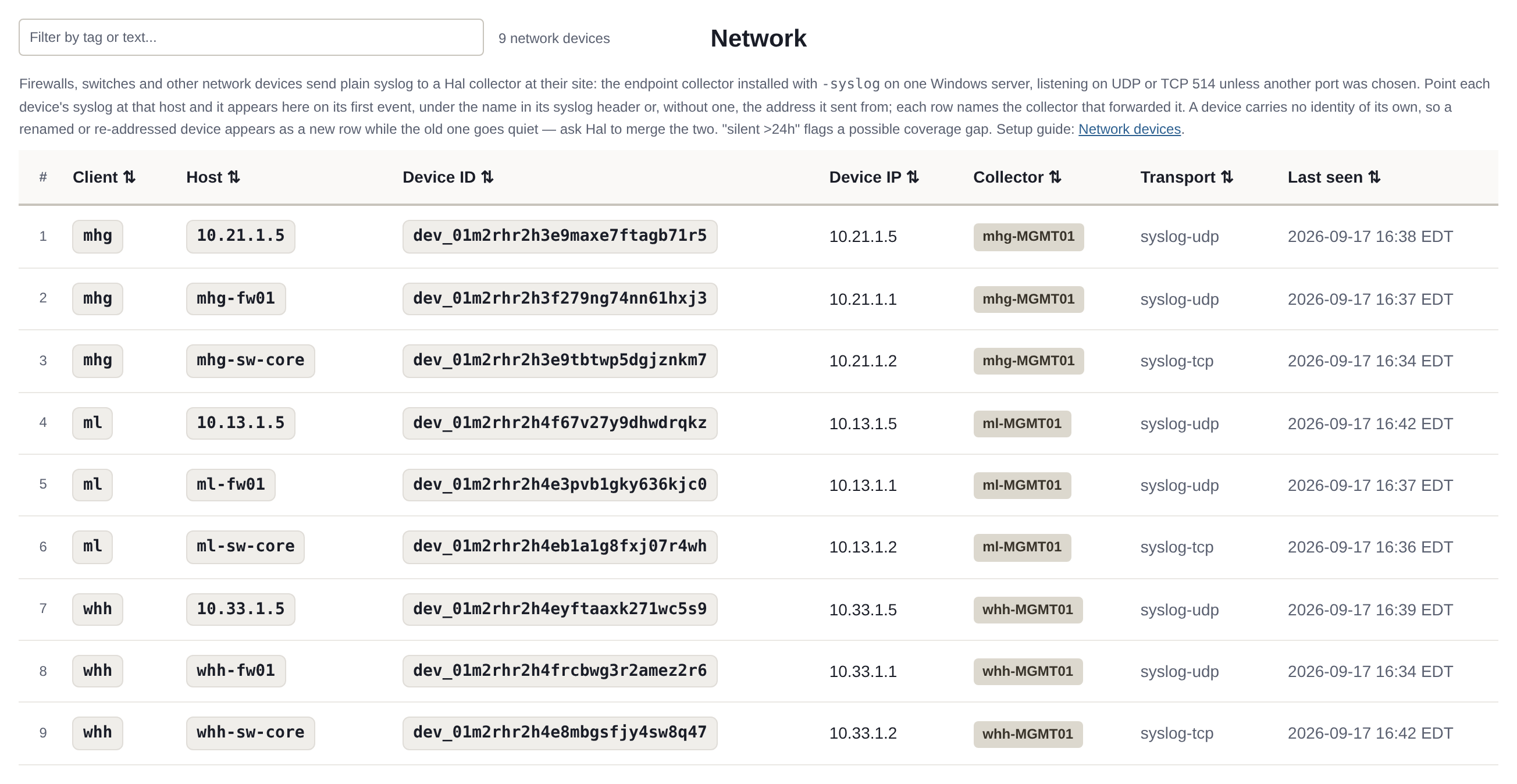
A device appears on Logs → Network under its hostname, or under its address when the header carries none, on the next detection cycle after its first line arrives, within a few minutes. Its row shows the address it sent from, the collector that forwarded it, the transport and the time of its last event, and Hal gives it a Device ID of its own, because a syslog device carries no identity of its own that a record could show. A device that is renamed or given a new address therefore appears as a new row while the old one goes quiet. Hal can list a client’s devices in chat as this page shows them, merge the old row into the new one when you ask, or remove a device that is gone.
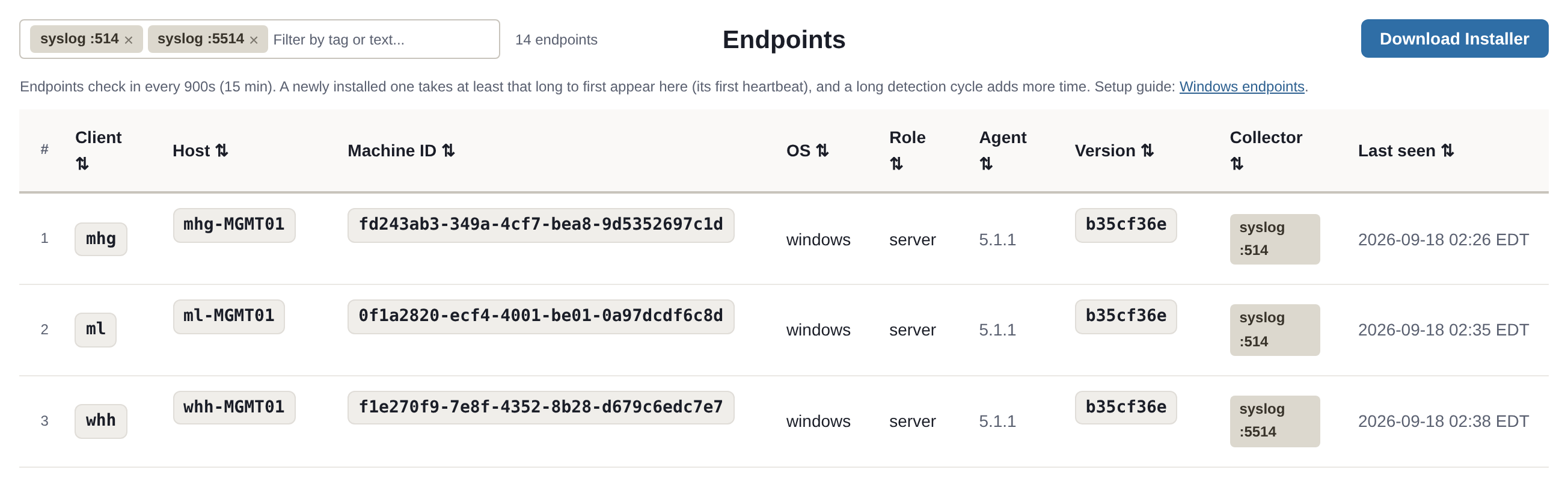
The collector host shows syslog :514, or your port, in the Collector
column of Logs → Endpoints after its next heartbeat, within 15 minutes,
and the tab’s Collector filter pill lists only the hosts that collect
their site’s syslog.
A device that sends nothing for more than 24 hours is flagged as a possible coverage gap.
If a device is sending and nothing appears, the collector writes its own log
at C:\Program Files\fluent-bit\fluent-bit.log on the host.
Changing or removing the collector
The command line is the truth on every run. A re-run without -syslog
turns the listener off and removes its firewall rules, so the RMM job that
refreshes a collector host must carry the flag: the site’s collector job
differs from the fleet job by that flag alone. On its next heartbeat the
host’s Collector column clears. -uninstall removes the collector, Fluent
Bit and the firewall rules together. Never remove a collector by deleting its
directory: that deletes the host’s identity file, and every device it collects
for reappears as a second row. The rule in full is on the
Windows endpoints page.
See also: the Windows endpoints guide for every installer option, the SIEM and read-only by architecture.
See what Hal surfaces on your own clients.
No deck. Ask us anything first. When you want to see Hal on your own tenants, we sign a short evaluation agreement and stand up your instance; you connect one tenant, Hal watches it for 14 days, and we walk you through what he found.
- 01You ask us your questions. No deck, no demo dataset.
- 02You sign a short evaluation agreement, and we stand up your own instance.
- 03You connect one tenant from your own admin console. Hal watches it for 14 days.
- 04We walk through what he found. Keep going month to month, or revoke the scopes yourself and stop.