Sentry
What it is
Some accounts at a client carry more risk than the rest: executives, finance staff, administrators. Sentry puts those people under a standing read. Every cycle Hal reads every event that names them and escalates anything that does not fit what is known about them, through the same second opinion and investigation as any other alert. A watch is the bounded, post-incident form; Sentry is standing and per person.
Adding a person
Name the client and the person in chat. Hal looks them up in the client’s directories and shows what he found: the account, its addresses, the Windows account name, the title, and each address’s activity over the last 7 days. Confirm it is the right person. That is the only question. Hal writes the description of what is normal for them from their own logs and the client’s integrations, and does not ask you for their role, devices, home network, phone or travel.
He confirms the identity by name, SENTRY-YYYYMMDD-NNN, with each alias’s
recent activity, what reading the person costs per day, and the description.
Anything you know that the logs do not, a leave of absence, an
administrator’s duties, tell him later and he adds it. To stop, ask him to
take the person out from under sentry; the readings and any reports stay on
record.

Alerts
A hit is an alert like any other: a report on the Events page whose summary opens with the identity’s name, emailed under your alert threshold and posted to Slack when that integration is connected. The report opens with a Sentry block naming the identity, the read it came from and the finding. A person already under sentry does not also get a post-incident watch.
The list
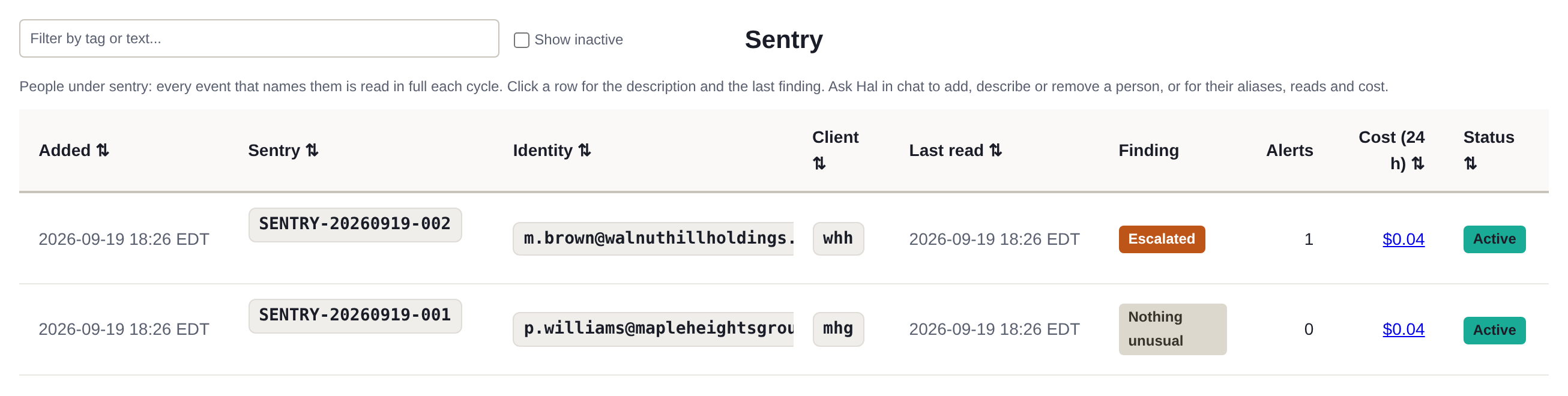
Memories → Sentry shows each person: when they were added, the Sentry name, the identity, the client, the last read, the finding, alerts raised, the cost over the last 24 hours, and whether the person is active, with inactive people behind a toggle. Before the first reading, the finding shows how far Hal has checked. Click a row for the description. In chat, ask who is under sentry for a client.
Cost
Reading a typical person costs cents a day. What costs more is what a read triggers: a second opinion, cents; an investigation, dollars. Hal reports a person’s cost as the total with that split. Ask him: how much did sentry cost for Patricia today? last week? Many investigations that concluded false positive mean the description is missing something you can tell him. The Costs page shows Sentry as its own line, with a drill-down per person.
See what Hal surfaces on your own clients.
No deck. Ask us anything first. When you want to see Hal on your own tenants, we sign a short evaluation agreement and stand up your instance; you connect one tenant read-only, Hal watches it for 14 days, and we walk you through what he found.
- 01You ask us your questions. No deck, no demo dataset.
- 02You sign a short evaluation agreement, and we stand up your own instance.
- 03You grant read-only scopes on one tenant in your own admin console. Hal watches it for 14 days.
- 04We walk through what he found. Keep going month to month, or revoke the scopes yourself and stop.