The AI security and operations platform for MSPs.
Hal is an intelligence, built on Anthropic's Claude models. He ingests every client's Microsoft 365, Google Workspace and infrastructure logs into a SIEM (read-only), then watches, reasons over and alerts on them around the clock, and answers when you ask. Four roles, one hire, billed per identity.
- 01 Every log source from every client, retained and audit-trailed to satisfy the carrier letter.
- 02 Every alert ships with the recommended fix, not just the warning.
- 03 Advises your techs in plain English. Doesn't bill by the hour.
- 04 Reads across every integration. Ask anything. Hal already knows.
Four roles. Watching every client every few minutes. One hire: Hal.
$5 per identity per month, list price · $600 monthly minimum · no setup fee · no charge by ingestion volume · AI usage billed separately by Anthropic to your own account · MSP partner pricing on request. Full terms
01 The position you are in
Your carrier wants logs. Your clients want answers. Answering both is a full-time job you cannot hire for.
Every renewal questionnaire now asks what you collect and how long you keep it. Most SIEM quotes price that by the gigabyte, so the bill moves when a client has a noisy week. And the alerts that come back are raw: someone on your team still has to decide whether each one matters.
Hiring a SOC analyst fixes the third problem and none of the first two. Hal is built for the shape of the actual job: many clients, one team, and a carrier letter with a deadline on it.
02 One hire, four roles
Hal isn't four products. He reads each environment once, then plays whichever role the moment calls for.
Whichever role he is playing, he reads the same environment: the logs in the SIEM plus live context from your RMM, documentation and network. Which is also why you can open a chat and ask about one client and get an answer about that client.
The SIEM your insurer wants.
Every log source from every client, ingested every few minutes and held for the retention window your carrier asks about. Priced by identity, so one client's noisy month does not move the invoice.
- Microsoft 365, Google Workspace, Entra ID, Windows endpoints, network gear
- 365-day searchable retention, across every source on every client
- Every source's status, last activity and silence threshold, per tenant

Every alert arrives with the fix in it.
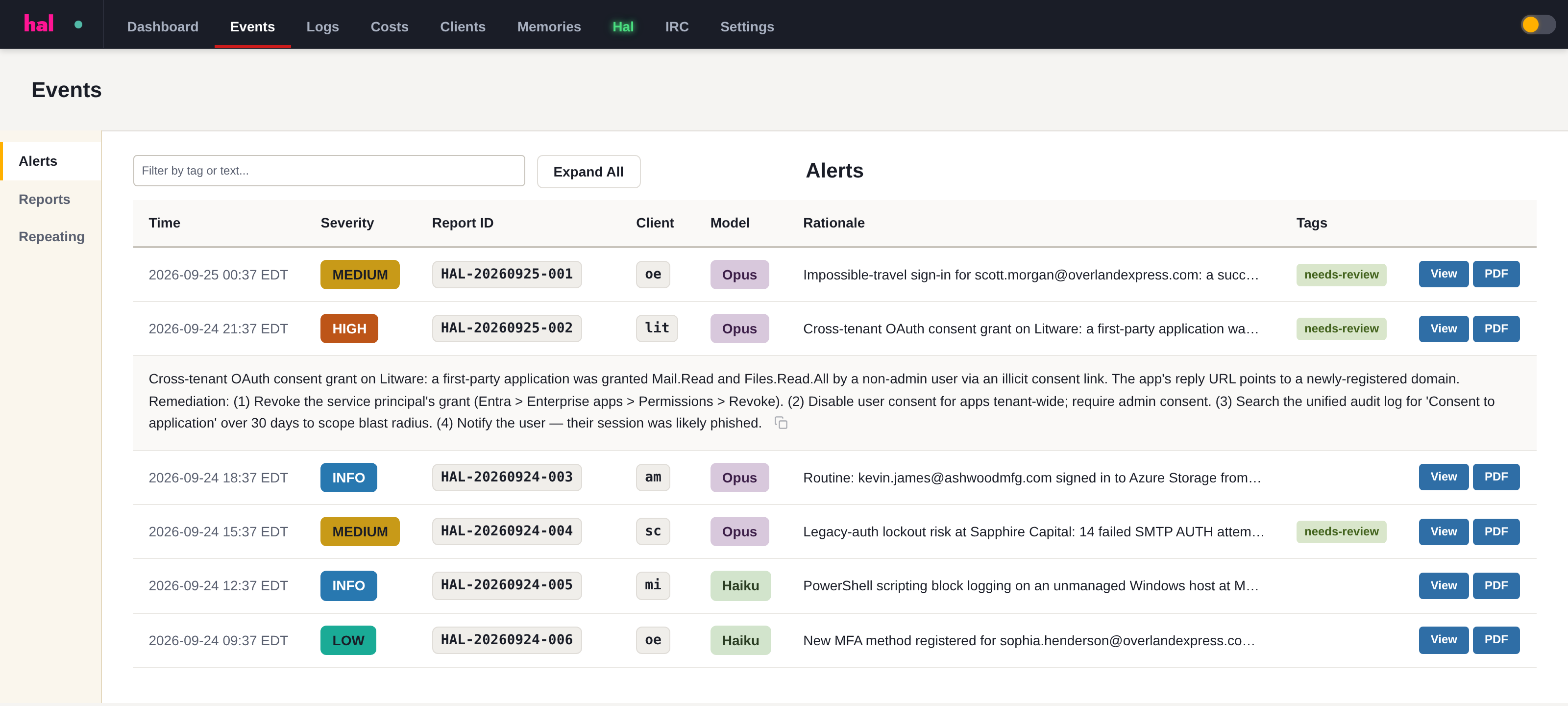
An event passes Sigma detection and two independent model judgments before it reaches you. What lands is the analyst summary, the affected identity and the steps in the order you would take them.
- Severity, affected identity, and the exact remediation
- 24×7 across every connected tenant, with no rota to staff
- Reports your team acts on, signed for when a client needs the evidence
A senior engineer for your MSP team.
Hand him a hard question and he works through the client's actual environment: the licensing, the sign-in history, the service accounts nobody documented. Then he comes back with a recommendation you can act on.
- Migration and rollout planning against what is really in the tenant
- A second opinion on a risky change, before you make it
- Walks a junior through a problem without tying up a senior

A knowledge worker over your whole stack.
Through your integrations he has already read every client's tenant, every PSA ticket, every documented runbook. Ask in plain English and the answer comes from across all of it at once.
- RMM, PSA, documentation, network and every connected tenant, together
- Per-client memory that survives the person who knew it
- Ask which of a client's machines are out of warranty, in those words

03 One portal, every client
Your whole book of business in one place, updated as Hal works.
Source health, the triage pipeline, this month's cost and every open alert, across every client, without switching tenants. A source that goes quiet shows up here as a flag rather than as a gap you find during an incident.

04 How an event becomes a conclusion
Two independent judgments stand between a log line and your inbox.
Most platforms send you everything and call the volume "visibility." Hal runs every event through a multi-tier pipeline, and an escalation has to survive two separate model judgments before he writes it up.
What each stage does, and how the second-opinion gate reaches a verdict, is on the AI SOC page.
05 Read-only by architecture
Hal can watch everything and break nothing.
Every credential you connect is read-only and scoped by you, and nothing Hal deploys can execute code pushed to it. There is no write path back into the environment, which means there is no version of this that takes a client down.
A log shipper, not an EDR
Microsoft 365, Google Workspace and Entra ID connect by API, nothing installed. For Windows event logs, the optional agent is a Fluent Bit forwarder that reads and ships. It never executes code pushed to it.
No kernel drivers
Nothing Hal installs runs in ring 0. A bad update to a userspace log shipper can at worst stop log collection. It cannot crash the machine.
You hold the keys
You grant the read-only scopes in your own Microsoft or Google admin console, and you can revoke or verify exactly what Hal can see, yourself, at any time.
Why this is the first thing we tell you
In July 2024 a faulty CrowdStrike kernel-driver update crashed an estimated 8.5 million Windows machines worldwide, grounding flights and halting hospitals. Every MSP that shipped that agent spent the week rebuilding machines by hand. That class of outage is architecturally impossible here, for the reason above: there is no kernel driver to update.
06 What Hal connects to
Events tell you what happened. Context tells you whether it matters.
Hal reads both together. Events without context are noise; context without events is a static inventory. Reading them together is why an alert arrives as a conclusion rather than a question.
Log sources: the events
Your MSP systems: the context
07 The questions you're actually asking
Is this a SIEM, or a SOC, or an AI assistant?
What do I actually have to install?
What stops him from flooding my team with alerts?
What happens when the model gets something wrong?
Does my clients' data sit next to another MSP's?
Can I hand the output to a client's auditor or cyber-insurance carrier?
What is this going to cost me at my size?
See what Hal surfaces on your own clients.
No deck. Ask us anything first. When you want to see Hal on your own tenants, we sign a short evaluation agreement and stand up your instance; you connect one tenant read-only, Hal watches it for 14 days, and we walk you through what he found.
- 01You ask us your questions. No deck, no demo dataset.
- 02You sign a short evaluation agreement, and we stand up your own instance.
- 03You grant read-only scopes on one tenant in your own admin console. Hal watches it for 14 days.
- 04We walk through what he found. Keep going month to month, or revoke the scopes yourself and stop.